

Commercial print PDF
Add physical page sizes, searchable text, CMYK output, bleed and trim marks with the optional print plugin
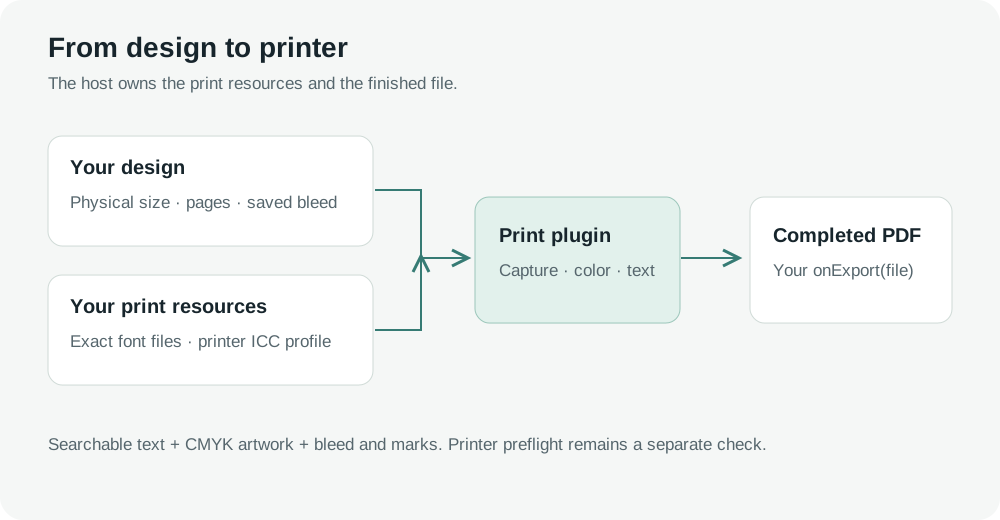
The image editor's optional print plugin creates PDFs at the design's physical size, with searchable text, embedded fonts and CMYK artwork. It works with the image-only package and the image editor in the universal package. It uses the editor's existing license check.
SDK 1.0.0 includes the integration point. The separate @layermetry/print-export package will be released separately. Standard image and PDF exports remain available without it.
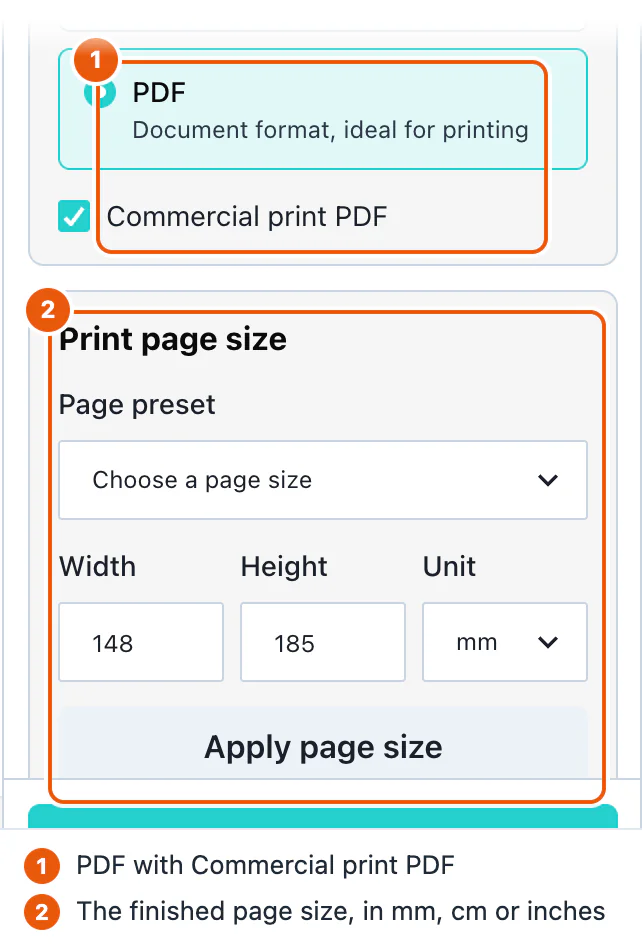
Standard PDF or commercial print
| Standard PDF | Optional print plugin | |
|---|---|---|
| Page size | Fits the design to the standard PDF page sizing | Uses the design's physical size |
| Text | Flattened into the page image | Real PDF text with subset-embedded fonts |
| Color | Screen-color artwork | CMYK artwork using your printer's ICC profile |
| Bleed and trim marks | Not included | Configurable; 3 mm bleed and trim marks on by default |
| Additional package | None | @layermetry/print-export |
The print plugin keeps shapes and pictures as raster artwork at the selected DPI. It does not turn every shape into an independently editable PDF vector object.
Connect the plugin
When the optional package is available, install it alongside your editor:
npm install @layermetry/image-editor @layermetry/print-exportUse @layermetry/media-editor instead of @layermetry/image-editor if your application embeds both editors. Supply a printer-approved CMYK ICC profile and the exact font files used in the design. These are files served by your application; they are not bundled printer profiles or fonts.
import { mountImageEditor } from '@layermetry/image-editor';
import { createPrintPlugin } from '@layermetry/print-export';

async function readBytes(url: string, signal?: AbortSignal): Promise<Uint8Array> {
  const response = await fetch(url, { signal });
  if (!response.ok) throw new Error(`Print resource returned HTTP ${response.status}`);
  return new Uint8Array(await response.arrayBuffer());
}

const fonts: Record<string, string> = {
  'Abel:400:normal': '/fonts/Abel-Regular.ttf',
};
const printPlugin = createPrintPlugin({
  profile: { name: 'Your printer CMYK profile', data: await readBytes('/print/press.icc') },
  resolveFont: async ({ family, weight, style }, signal) => {
    const url = fonts[`${family}:${weight}:${style}`];
    if (!url) throw new Error(`No print font configured for ${family} ${weight} ${style}`);
    return { data: await readBytes(url, signal) };
  },
  defaultSize: { width: 210, height: 297, unit: 'mm' },
  defaults: { dpi: 300, bleedMm: 3, trimMarks: true },
});

const container = document.getElementById('editor');
if (!container) throw new Error('Missing editor container');
container.style.width = '100%';
container.style.height = '800px';
const editor = mountImageEditor(container, {
  licenseKey: 'YOUR_LICENSE_KEY',
  printPlugin,
  onClose() { editor.unmount(); },
  onExport(file) {
    // Save, upload or deliver the completed file in your application.
    console.info(file.name, file.type, file.size);
  },
});
// Call editor.unmount() when your page is removed too.
Create the plugin once and keep the same object for the editor session. In React, pass that stable object as printPlugin to ImageEditor from the chosen SDK's /react entry. Recreating the plugin during a render cancels an export in progress. Custom-element hosts pass it as a JavaScript property, alongside the other editor options.
Choose the physical size
Open Export, choose PDF, and enable Commercial print PDF. Choose a preset or enter a custom size, then press Apply page size. Presets include A4, A5, US Letter, an 85 × 55 mm business card and A3. Hosts can replace the presets or set allowCustomSize: false.
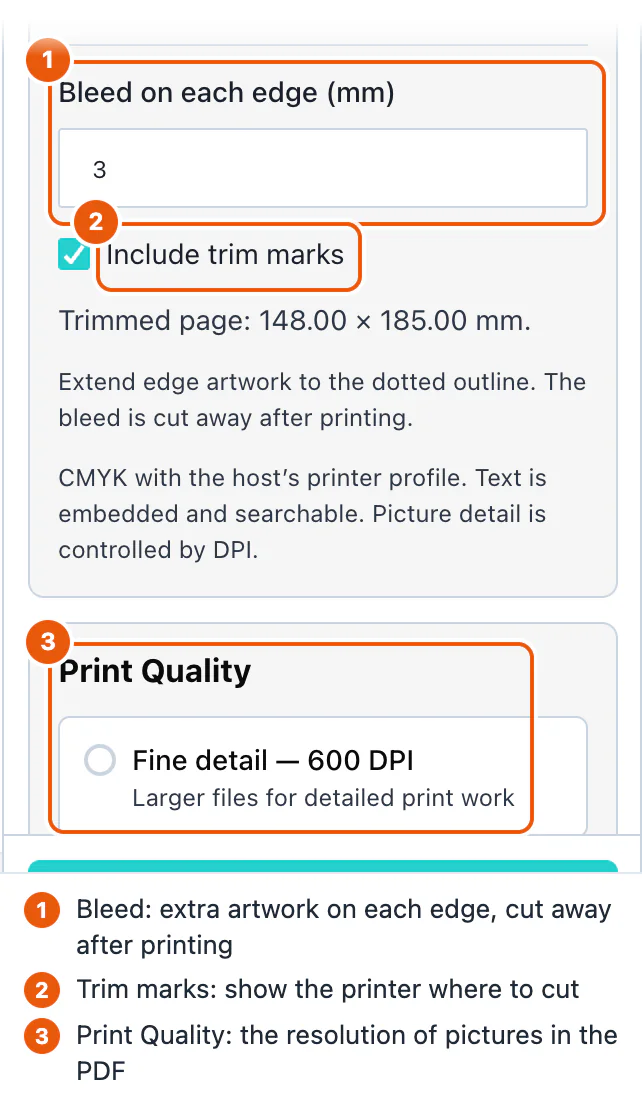
The saved physical size describes the finished page after trimming. Output DPI changes picture detail, not the physical page size. The panel offers 96, 150, 300 and 600 DPI; 300 is the default. Older pixel-only documents use 96 authoring pixels per inch until a physical size is set.
Page size and bleed are document edits, follow resize permissions and support Undo. A saved printPage.bleedMm: 0 means no bleed, even when the host's default is 3 mm.
Bleed and trim marks
Extend artwork that touches an edge into the bleed. The default is 3 mm on every edge. The on-screen dotted guide is not printed. Trim marks sit outside the bleed in an additional 5 mm margin when enabled.
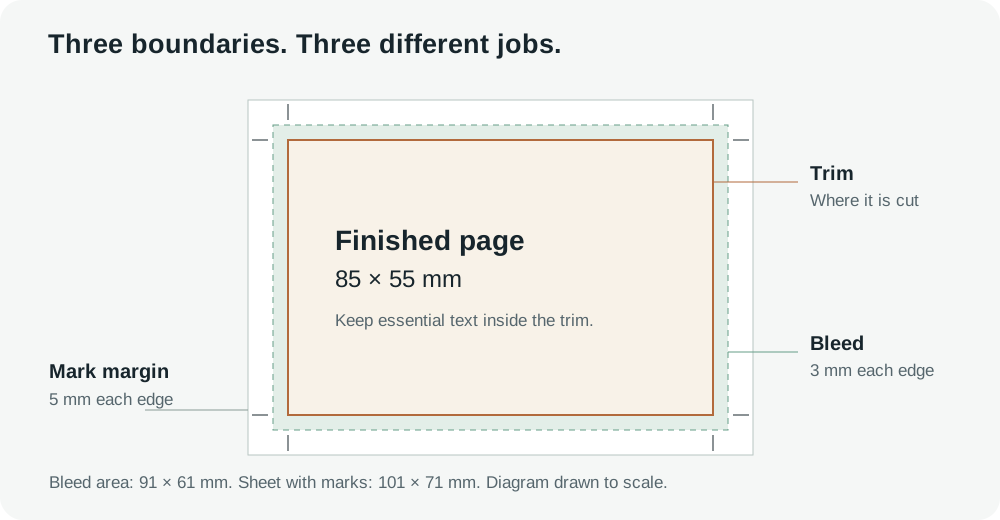
Background artwork extends into the bleed. Photo backgrounds are cover-fitted over the larger area, so important details near an edge may move within the finished trim. Inspect the design before exporting.
In a multi-page design, each page keeps its own saved bleed. Apply to all pages copies the open page's bleed to the other pages, preserving their sizes. The whole change is refused if a page's resize permissions prevent it. Undo is separate for each page: open a changed page and use Undo to restore that page's prior bleed.
Fonts, color and printer checks
resolveFont must return the exact font family, weight and style used by the design. The plugin refuses unavailable glyphs and fonts that prohibit embedding or subsetting. Provide font and profile files that you are entitled to embed; browser fallback fonts are not embedded automatically.
The plugin adds PDF/X-4 metadata, the supplied CMYK output intent, page boxes and optional trim marks. These identifiers are not a PDF/X certification. Run your printer's preflight checks and obtain its approval of the output profile and file.
The first release does not support raster text filters such as blur and pixelation, radial or pattern text fills, or clipped and filtered text groups. Unsupported print content is refused rather than silently flattened into unsearchable text.
Large files and cancellation
Raster work is captured in tiles, defaulting to 1024 × 256 pixels. The default memory output stops at 128 MiB. Hosts that need larger output can supply createOutput(signal) and an explicit maxOutputBytes; an optional file-backed output helper is available for browsers with private file storage.
The full sheet, including bleed and marks, is limited to 200 inches per side. The writer accepts integer DPI values from 1 to 2400; that is not a guarantee that every browser can export every size at that resolution. Test the largest designs your application permits.
Cancel stops the current export and keeps the design. Unmounting the editor or replacing its plugin aborts an active export. Keep file-backed output alive until the host has finished reading or uploading it, then release its files.
Before offering print to your users
- Obtain the printer's CMYK profile and preflight requirements.
- Serve every required font, weight and style with embedding permission.
- Set page presets and a maximum output size appropriate to your product.
- Check physical size, bleed, trim, photo edges and searchable text in the exported PDF.
- Test cancellation, missing fonts and large files in your supported browsers.
- Store the design's print-page record when saving templates.
See standard export, asset storage and saving and loading.
Watch: print settings
Follow four steps: choose PDF, check the finished page size, check the 3 mm bleed and trim marks, then choose 300 DPI.