

Saving and loading
Store designs in your own backend and load them back into the image editor.
The editor does not store designs itself. It hands each design to your code as a template object, and asks your code for the list of templates. Your code stores them where you want.
This page connects both directions to your server:
'use client';

import dynamic from 'next/dynamic';
import type { Template } from '@layermetry/media-editor/react';

const ImageEditor = dynamic(
  () => import('@layermetry/media-editor/react').then((mod) => mod.ImageEditor),
  { ssr: false },
);

async function saveTemplate({ template, ...metadata }: { template: Template }) {
  const response = await fetch('/api/templates', {
    method: 'POST',
    headers: { 'Content-Type': 'application/json' },
    body: JSON.stringify({ template, ...metadata }),
  });
  // A rejected promise tells the user that the template was not saved.
  if (!response.ok) throw new Error(`Save failed: ${response.status}`);
}

async function getTemplates(): Promise<Template[]> {
  const response = await fetch('/api/templates');
  if (!response.ok) throw new Error(`Loading failed: ${response.status}`);
  return response.json();
}

export default function EditorPage() {
  return (
    <div style={{ position: 'fixed', inset: 0 }}>
      <ImageEditor
        licenseKey={process.env.NEXT_PUBLIC_LAYERMETRY_LICENSE_KEY!}
        onClose={() => console.log('The editor was closed')}
        onSaveTemplate={saveTemplate}
        onGetTemplates={getTemplates}
        templateMetadata={{ metadata: { brand: 'acme' } }}
      />
    </div>
  );
}
Saving designs
onSaveTemplate receives { ...metadata, template } when the user saves. Return a promise. When it resolves, the user sees "Template saved". When it rejects, the user sees "Template wasn't saved" and can try again.
onSaveTemplate={saveTemplate}Default: none. Without onSaveTemplate, the editor hides every save button, and the console says why.
The user saves with the Save template button in the toolbar above the page, or with Save current design in the Templates panel. The editor waits 30 seconds for your promise. After that, it tells the user that it cannot say whether the design was saved.
The value that your promise resolves with is ignored. Only success or failure counts.
templateMetadata.metadata adds your own fields to every save. They arrive next to template, at the top level: { brand: 'acme', template }.
When the editor has an active brand kit, the template also carries template.brandKitId, the id of that kit. The editor reads it back when the design opens. It is not written into your metadata. See Saved designs.
Loading designs
onGetTemplates returns the list of templates. The editor calls it each time the user opens the Templates panel, and when the user presses Refresh. A click on a template loads it onto the page.
onGetTemplates={getTemplates}Default: none. Without it, the Templates panel says "Template loading is not configured".
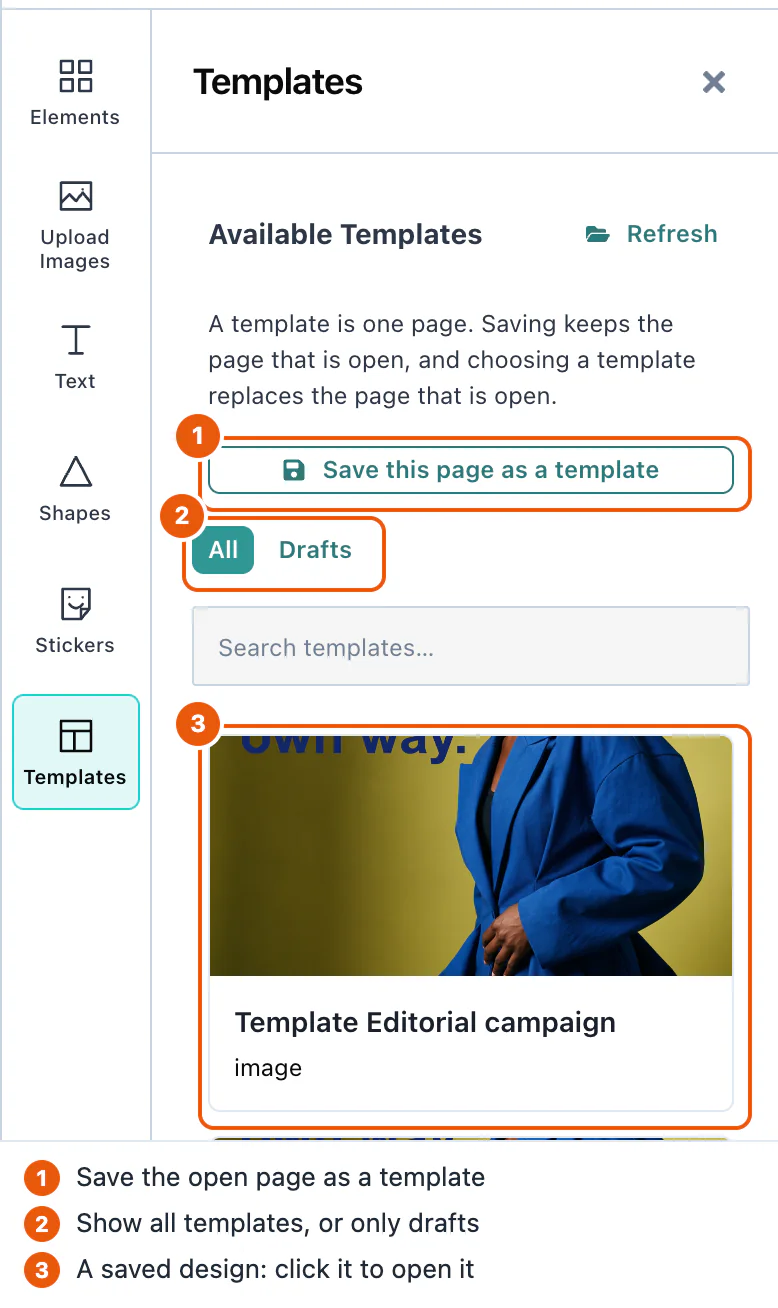
The panel shows a template only when it has scene, a thumbUri, and sceneMode: 'image'. Return the objects that onSaveTemplate received, and they meet these rules.
To open the editor with a design already on the page, pass the template as defaultTemplate. The editor reads it once, when it starts.
<ImageEditor licenseKey="YOUR_LICENSE_KEY" onClose={close} defaultTemplate={savedTemplate} />A template keeps the page size it was made with. templateCanvasPolicy decides what happens when that size differs from the current page:
| Value | What happens |
|---|---|
'adopt' | The page takes the size of the template. The design looks exactly as it was made. This is the default. |
'fit' | The page keeps its size. The design is scaled to fit inside it, and centered. |
'place' | The page keeps its size, and the design is placed without scaling. |
Drafts
A draft is a design that the user has not finished. Save draft in the export panel saves it through the same onSaveTemplate, with draft: true in the template. The Templates panel then shows a Drafts filter with the number of drafts.
Saving a draft again updates the same record. The first draft save of a design makes a new template.id, and every later draft save of that design sends the same id, from the button, the keyboard, or automatic saving. Opening a draft from the Templates panel continues that draft under its own id. Opening another template, the defaultTemplate, or a new blank design starts a new record. A finished template save gets a new id every time. Store drafts by template.id, and replace a record that has the same id.
To save drafts while the user works, set ui.drafts.autosave. Default: false.
ui={{ drafts: { autosave: true } }}Autosave starts after the user presses Save draft once. Then each change starts a 30-second wait, and each further change starts the wait again. So a user who keeps working is saved once, 30 seconds after the last change.
Server-side handling
Store each template as the editor gives it to you, and return the same objects from your list. This route handler keeps them in memory:
import type { Template } from '@layermetry/media-editor/react';

// Replace this Map with your database.
const templates = new Map<string, Template & { brand?: string }>();

// The editor saves a template: { ...your metadata, template }.
export async function POST(request: Request) {
  const { template, ...metadata } = await request.json();
  templates.set(template.id, { ...template, ...metadata });
  return Response.json({ id: template.id }, { status: 201 });
}

// The editor lists templates.
export async function GET() {
  return Response.json(Array.from(templates.values()));
}
A template has these fields:
| Field | Type | Description |
|---|---|---|
id | string | A new UUID for each save. |
scene | string | The design, as JSON text. Store it as it is. |
thumbUri | string | A small PNG picture of the design. It is a data: URL, or the address that onUploadAsset returned. |
sceneMode | string | 'image' for designs of the image editor. |
global | boolean | false. |
schemaVersion | number | The version of the scene format, 1. |
canvasWidth, canvasHeight | number | The page size in pixels, for example 1080 × 1080. |
draft | boolean | true for a draft. Absent for a finished template. |
The Template type also declares voiceoverScript. Only the video editor writes it.
The pictures in a design are stored inside scene, unless you pass onUploadAsset. See Asset storage.
Each save also sends a templatesave DOM event, with detail: { template, saved }. Use it to log saves in code that does not do the saving. See Events.