

AI providers
Connect the editor's AI features to your own server, with your own models and settings.
Pass ai to connect generation controls to your server or your function. Keep provider credentials on your server.
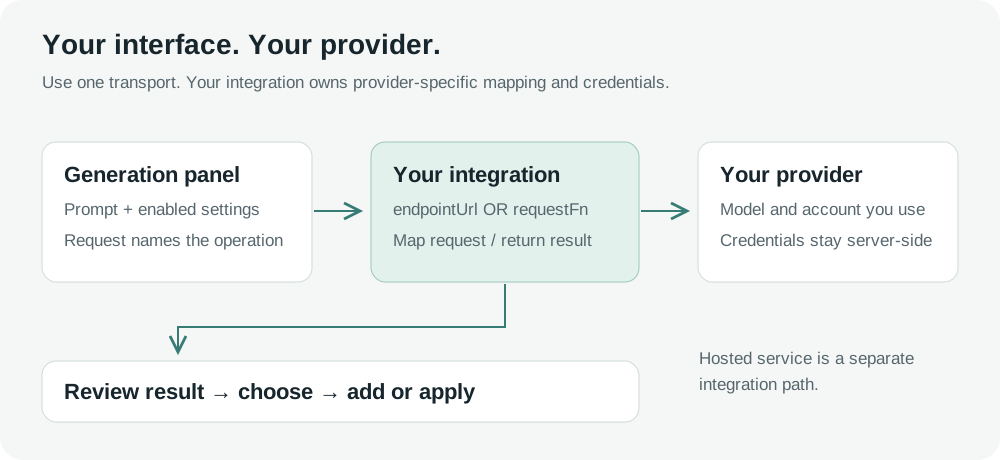
Setup levels
Choose the amount of configuration your application needs.
| Level | Configuration |
|---|---|
| Minimum | An endpointUrl or requestFn, with an operation enabled. |
| Optional | Models, labels, fields, restrictions, headers and timeout. |
| Advanced | Bindings, fixed values, response mapping, retries and hooks. |
Minimum setup
Pass your endpoint and enable picture generation.
import { VideoEditor } from '@layermetry/media-editor/react';

export default function App() {
  return <VideoEditor
    licenseKey="YOUR_LICENSE_KEY"
    onClose={() => console.log('Editor closed')}
    ai={{ endpointUrl: '/api/ai', image: true }}
  />;
}
An operation accepts true, false, or an options object. Omitted operations remain enabled when a usable provider exists. Without ai, generation controls are hidden.
Use exactly one transport. Combining transports or adding an unknown top-level key disables AI. The console names the invalid settings.
Rename endpointUrl
Replace the former proxyUrl key with endpointUrl. There is no compatibility alias. An ai.proxyUrl setting disables AI through the configuration check.
Models and settings
List the models your server supports for each operation.
import { defineGenerationModel, type EditorAIConfig } from '@layermetry/media-editor';

const fastImages = defineGenerationModel({
  id: 'fast-images', label: 'Fast images', modelId: 'vendor-fast-image-1',
  operation: 'image', revision: '2026-10-11',
  fields: [
    { name: 'size', label: 'Size', options: ['1024x1024', '1536x1024'], defaultValue: '1024x1024' },
    { name: 'quality', label: 'Quality', options: ['low', 'medium', 'high'] },
  ],
});
const detailedImages = defineGenerationModel({
  id: 'detailed-images', label: 'Detailed images', operation: 'image', revision: '2026-10-11',
});
export const ai: EditorAIConfig = {
  endpointUrl: '/api/ai',
  image: { models: [fastImages, detailedImages], defaultModel: 'fast-images' },
};
The Model selector appears with two or more models. One model has no selector. Your list contains at least one model. Choose models or the classic providers list for an operation; you cannot use both.
Model entries
A model requires only label.
| Key | Default | Description |
|---|---|---|
id | Omitted | Your stable catalog entry name, sent as catalogId. |
label | Required | The name displayed to the user. |
modelId | Omitted | Your server or provider model name, sent unchanged. |
provider | Omitted | { id, label? } groups choices without routing a request. |
operation | The containing operation | It must match the operation that lists this model. |
fields | No fields | Settings in display order. |
revision | Computed from fields | Identifies the field schema used by the form. |
parseRaw | No parser | Validates your response before mapping it. |
mapResponse | No mapper | Converts your response into the operation result. |
With two or more models, every entry needs id or modelId. defaultModel names the entry by id, or by modelId when it has no id. The first entry is selected when defaultModel is omitted. A wrong defaultModel disables AI at startup.
An open form with an outdated revision is refused before submission. Reopen the form after changing its fields.
Fields
Each field requires name and label.
| Key | Default | Description |
|---|---|---|
name | Required | The setting name sent to your server. |
label | Required | The label displayed to the user. |
type | string | string, number or boolean. |
options | Unrestricted | A closed list of values or { value, label? } choices. |
defaultValue | Omitted | The starting value; an unset field is absent from the request. |
min, max, step | Unrestricted | Bounds for a number field without options. |
integer | false | Restricts a number field to whole numbers. |
maxLength | Unrestricted | Bounds the length of a string field. |
help, placeholder | Omitted | Explanation and placeholder text. |
required | false | Refuses submission when the field has no value. |
The Before you generate summary lists the model and each setting. A bound aspect-ratio field without a default starts at the offered ratio nearest to the canvas. An unset optional field says provider default and is not sent. An unset required field says not set and prevents submission. Advanced, hidden and fixed model field values remain visible in the summary. Unset local-only fields are omitted.
What your server receives
Models send their settings in input.generation with no options object.
{
  "type": "image",
  "prompt": "A red fox in snow",
  "input": {
    "operation": "image", "prompt": "A red fox in snow",
    "generation": {
      "contract": 1, "catalogId": "fast-images",
      "modelId": "vendor-fast-image-1", "revision": "2026-10-11",
      "settings": { "size": "1024x1024" }
    }
  }
}
quality is absent because the user has not selected it. See Requests with models for the response contract.
Pictures
Picture operations return image addresses or SVG path data. These field names are examples for your server; the editor does not translate them into provider API settings.
Generate pictures
Configure image independently.
import { type EditorAIConfig } from '@layermetry/media-editor';

export const ai: EditorAIConfig = {
  endpointUrl: '/api/ai',
  image: { models: [{
    label: 'Generate pictures',
    fields: [{ name: 'size', label: 'Size', options: ['1024x1024', '1536x1024'], defaultValue: '1024x1024' }],
  }] },
};
Edit pictures
Configure imageEdit independently.
import { type EditorAIConfig } from '@layermetry/media-editor';

export const ai: EditorAIConfig = {
  endpointUrl: '/api/ai',
  imageEdit: { models: [{
    label: 'Edit pictures',
    fields: [{ name: 'strength', label: 'Change strength', type: 'number', min: 0, max: 1, defaultValue: 0.5 }],
  }] },
};
The request contains the selected picture in input.source. It can also contain mask and sourceSize.
Generate stickers
Configure sticker independently.
import { type EditorAIConfig } from '@layermetry/media-editor';

export const ai: EditorAIConfig = {
  endpointUrl: '/api/ai',
  sticker: { models: [{
    label: 'Generate stickers',
    fields: [{ name: 'n', label: 'Results', type: 'number', options: [1, 2, 3, 4], defaultValue: 2, bindTo: 'count' }],
  }] },
};
image: false leaves sticker generation enabled. See Generated stickers for defaults and outline settings.
Generate shapes
Configure svgPath independently.
import { type EditorAIConfig } from '@layermetry/media-editor';

export const ai: EditorAIConfig = {
  endpointUrl: '/api/ai',
  svgPath: { models: [{
    label: 'Generate shapes',
    fields: [{ name: 'detail', label: 'Detail', options: ['simple', 'detailed'], defaultValue: 'simple' }],
  }] },
};
Text
Text operations return suggestions or rewritten words.
Generate text
Configure text independently.
import { type EditorAIConfig } from '@layermetry/media-editor';

export const ai: EditorAIConfig = {
  endpointUrl: '/api/ai',
  text: { models: [{
    label: 'Generate text',
    fields: [{ name: 'tone', label: 'Tone', options: ['neutral', 'friendly'], defaultValue: 'neutral' }],
  }] },
};
Rewrite text
Configure textRewrite independently.
import { type EditorAIConfig } from '@layermetry/media-editor';

export const ai: EditorAIConfig = {
  endpointUrl: '/api/ai',
  textRewrite: { models: [{
    label: 'Rewrite text',
    fields: [{ name: 'length', label: 'Length', options: ['shorter', 'same'], defaultValue: 'shorter' }],
  }] },
};
The request contains input.text and input.instruction instead of input.prompt.
Generate a text template
The textTemplate operation returns editable groups of text and simple rectangles. Configure it independently with ai.textTemplate. With hosted AI, text-template generation is disabled unless you explicitly set ai.textTemplate; hosted AI is not available in version 1.0.0.
A request includes mode (new or restyle), the selected category, prompt, up to three examples, canvas dimensions, available fonts, and a result count from 1 to 6. In restyle mode, selected carries the selected text and its layout. Examples are ordered with the selected style first, then host templates in that category, then built-ins. The SDK checks the answer before showing it and drops invalid templates.
{
  "type": "textTemplate",
  "prompt": "A red sale badge",
  "input": {
    "operation": "textTemplate",
    "mode": "new",
    "category": "sale",
    "prompt": "A red sale badge",
    "examples": [],
    "canvas": { "width": 1920, "height": 1080 },
    "fonts": ["Montserrat", "Anton"],
    "count": 3
  },
  "options": { "action": "textTemplate", "count": 3 }
}
Return an answer shaped as { items: [{ template: AITextTemplate }], receipt? }. For example:
{"items":[{"template":{"name":"Red sale","category":"sale","w":300,"h":100,"layers":[{"text":"SALE","x":0,"y":0,"width":300,"fontFamily":"Anton","fontSize":80}]}}]}See Text templates for the complete format and host setting.
Sound
Sound operations create audio or transcribe speech.
Generate voiceover
Configure voice independently.
import { type EditorAIConfig } from '@layermetry/media-editor';

export const ai: EditorAIConfig = {
  endpointUrl: '/api/ai',
  voice: { voices: ['narrator'], models: [{
    label: 'Generate voiceover',
    fields: [{ name: 'voice_id', label: 'Voice', bindTo: 'voice', options: [{ value: 'narrator', label: 'Narrator' }], defaultValue: 'narrator' }],
  }] },
};
Generate music
Configure music independently.
import { type EditorAIConfig } from '@layermetry/media-editor';

export const ai: EditorAIConfig = {
  endpointUrl: '/api/ai',
  music: { minDurationSeconds: 1, maxDurationSeconds: 30, models: [{
    label: 'Generate music',
    fields: [{ name: 'seconds', label: 'Length (seconds)', type: 'number', bindTo: 'durationSeconds', options: [15, 30], defaultValue: 15 }],
  }] },
};
Generate sound effects
Configure soundEffect independently.
import { type EditorAIConfig } from '@layermetry/media-editor';

export const ai: EditorAIConfig = {
  endpointUrl: '/api/ai',
  soundEffect: { minDurationSeconds: 1, maxDurationSeconds: 30, models: [{
    label: 'Generate sound effects',
    fields: [{ name: 'seconds', label: 'Length (seconds)', type: 'number', bindTo: 'durationSeconds', options: [1, 3, 5], defaultValue: 3 }],
  }] },
};
Generate captions
Configure captions independently.
import { type EditorAIConfig } from '@layermetry/media-editor';

export const ai: EditorAIConfig = {
  endpointUrl: '/api/ai',
  captions: { transport: { endpointUrl: '/api/captions' }, languages: ['en', 'fr'], models: [{
    label: 'Generate captions',
    fields: [{ name: 'language', label: 'Spoken language', bindTo: 'language', options: ['en', 'fr'], defaultValue: 'en' }],
  }] },
};
Set captions.transport explicitly. Captions do not inherit the top-level transport. An endpoint receives a multipart upload; a callback receives a request containing the audio Blob.
Video
Video operations create a clip from a prompt or a source picture.
Generate video
Configure video independently.
import { type EditorAIConfig } from '@layermetry/media-editor';

export const ai: EditorAIConfig = {
  endpointUrl: '/api/ai',
  video: { maxDurationSeconds: 6, aspectRatios: ['9:16'], models: [{
    label: 'Generate video',
    fields: [{ name: 'seconds', label: 'Length (seconds)', type: 'number', bindTo: 'durationSeconds', options: [4, 6], defaultValue: 6, required: true }],
  }] },
};
Animate pictures
Configure imageToVideo independently.
import { type EditorAIConfig } from '@layermetry/media-editor';

export const ai: EditorAIConfig = {
  endpointUrl: '/api/ai',
  imageToVideo: { maxDurationSeconds: 6, aspectRatios: ['9:16'], models: [{
    label: 'Animate pictures',
    fields: [{ name: 'aspect_ratio', label: 'Shape', bindTo: 'aspectRatio', options: ['9:16'], defaultValue: '9:16', fixed: true }],
  }] },
};
The request requires input.source. Its prompt is optional.
Headers and timeout
Configure authentication and submission limits on endpointUrl.
import type { EditorAIConfig } from '@layermetry/media-editor';

export const ai: EditorAIConfig = {
  endpointUrl: '/api/ai',
  headers: async ({ purpose, signal }) => {
    const response = await fetch('/api/session-token', { signal });
    if (!response.ok) throw new Error('Session token unavailable');
    const session: { token: string } = await response.json();
    return { Authorization: `Bearer ${session.token}`, 'X-AI-Purpose': purpose };
  },
  credentials: 'same-origin', timeoutMs: 120_000, image: true,
};| Setting | Default | Contract |
|---|---|---|
headers | None | A static object or function returning string header values. |
credentials | same-origin | Accepts omit, same-origin or include. |
timeoutMs | No submission timeout | A positive finite number of milliseconds. |
maxRetries | 0 | Additional submission attempts with an idempotency header. |
idempotencyKeyHeader | None | The header your server uses to prevent duplicate work. |
A headers function receives { purpose, operation, catalogId?, modelId?, url, signal }. Its purposes are generate and models. Headers are resolved before each attempt and sent only to the endpoint’s origin.
The editor refuses browser-controlled headers, including Cookie, Origin, Host, Referer, names beginning with Proxy- or Sec-, and Content-Type. The editor sets the JSON content type. The browser sets multipart boundaries. Custom headers do not bypass CORS.
credentials: 'include' requires your server to allow credentials with an explicit CORS origin. With configured headers or credentials: 'include', requests use redirect: 'manual'. A redirect fails instead of forwarding authentication. Other requests follow redirects.
timeoutMs covers submission, not job polling. Timeout or cancellation does not prove the server stopped or refunded the work. Long-job status and cancellation requests carry no host headers in this release.
Proxy URL
The public setting for your server address is endpointUrl.
Your server receives a POST request. Your SDK license key is not sent to this endpoint.
Request function
A callback receives the same request object and an AbortSignal.
import type { EditorAIConfig } from '@layermetry/media-editor';

export const ai: EditorAIConfig = {
  requestFn: async (request, signal) => {
    const response = await fetch('/api/ai', {
      method: 'POST', headers: { 'Content-Type': 'application/json' },
      body: JSON.stringify(request), signal,
    });
    if (!response.ok) throw new Error(`AI request failed: ${response.status}`);
    return response.json();
  },
  timeoutMs: 120_000, image: true, captions: false,
};
This JSON callback example disables captions. A captions callback must handle its audio Blob separately. With requestFn, the SDK accepts only timeoutMs as a transport option. Your function owns headers, cookies and retries. An ordinary thrown error becomes transport-failed; an AIRequestError keeps its code.
Session limits
limits.maxPerSession caps attempts across operations in one editor session.
import type { EditorAIConfig } from '@layermetry/media-editor';

export const ai: EditorAIConfig = {
  endpointUrl: '/api/ai', limits: { maxPerSession: 20 },
  image: { maxPerSession: 5 }, sticker: { maxPerSession: 10 },
};
The default is unlimited. Failed submitted attempts count toward the limit. A new session resets the count. These browser limits do not enforce billing or prevent abuse; enforce those limits on your server.
Per-feature options
Each operation can select its own model list, transport and session limit.
| Option | Operations | Default |
|---|---|---|
models, defaultModel | All supported operations | Built-in request builder; first listed model when supplied. |
providers | All supported operations | Built-in provider when no list is supplied. |
transport | All supported operations | Main transport, except captions. |
maxPerSession | All supported operations | Unlimited. |
maxDurationSeconds, aspectRatios | video, imageToVideo | No duration ceiling; all four ratios. |
voices | voice | No host voice restriction. |
languages | captions | Automatic detection when no language is selected. |
minDurationSeconds, maxDurationSeconds | music, soundEffect | Server model bounds when available. |
Without a bound field, video length starts at 8 seconds, reduced to your maxDurationSeconds when lower. Shape starts at the allowed ratio nearest to the canvas. A model field cannot widen host duration, ratio, voice or language restrictions.
Brand
When the editor has an active brand kit, each Generate box shows a Use brand switch. ai.brand changes this. Its value is false or an object.
| Setting | Default | Description |
|---|---|---|
brand: false | Brand is on | Removes the switch from every box. Nothing is added to a prompt, and input.brand is never sent. |
brand.addToPrompt | true | false keeps the switch and sends input.brand, but adds no words to the prompt. |
brand.operations | On, except imageEdit | Sets, for each operation, whether the switch starts on. |
ai={{ endpointUrl: '/api/ai', brand: { addToPrompt: false } }}The editor refuses operations.soundEffect, operations.captions, an unknown key, and the value true, and it names the setting in the error. Your server reads the brand facts from input.brand. See Custom AI endpoint and Generate with brand.
Advanced
Advanced settings control what your server receives and how responses become editor results.
Field controls
Declare the editor meaning of a field with bindTo. The editor never guesses from the field name.
import { defineGenerationModel, type EditorAIConfig, type AIGenerationSettingsOfModel } from '@layermetry/media-editor';

const model = defineGenerationModel({
  label: 'Configured model', operation: 'video',
  fields: [
    { name: 'seconds', sendAs: 'duration', label: 'Length (seconds)', type: 'number', bindTo: 'durationSeconds', options: [4, 6], defaultValue: 6, required: true },
    { name: 'quality', label: 'Quality', options: ['low'], defaultValue: 'low', hidden: true, fixed: true },
    { name: 'seed', label: 'Seed', type: 'number', integer: true, advanced: true },
    { name: 'note', label: 'Local note', localOnly: true },
  ],
});
export type Settings = AIGenerationSettingsOfModel<typeof model>;
export const ai: EditorAIConfig = { endpointUrl: '/api/ai', video: { models: [model] } };| Property | Default | Behavior |
|---|---|---|
sendAs | name | Renames the outgoing settings key. |
bindTo | None | Replaces the matching editor control and applies host restrictions. |
advanced | false | Places the field under collapsed Advanced settings. |
fixed | false | Disables editing and refuses values other than the default. |
hidden | false | Hides the input while retaining its value in the summary. |
localOnly | false | Omits the field from generation.settings. |
Bindings are aspectRatio for image and video, durationSeconds for video and generated sound, voice for voiceover, language for captions, and count for stickers. Each binding appears once per model. imageToVideo supports the same ratio and duration bindings as video. A bound value is also reflected in the corresponding input field. Local-only bound controls can still affect those input fields; localOnly is not a secrecy setting.
Fixed fields and hidden required fields need a default. A local-only field cannot be required. A model supports at most 40 fields with 200 options per field.
Native and outgoing names cannot be operation, prompt, text, instruction, source, mask, sourceSize, audio, type, input, options, generation, settings, catalogId, modelId, revision, contract, __proto__, constructor or prototype. defineGenerationModel checks duplicate and reserved names at compile time. AIGenerationSettingsOfModel and AIGenerationRequestOf describe the outgoing settings and request.
Response mapping
Validate a custom response with parseRaw, then convert it with mapResponse.
import { defineGenerationModel, type EditorAIConfig } from '@layermetry/media-editor';

const model = defineGenerationModel({
  label: 'Images', operation: 'image',
  parseRaw(body: unknown): { images: { url: string }[] } {
    if (typeof body !== 'object' || body === null || !('images' in body)) {
      throw new Error('Expected images');
    }
    const images = body.images;
    if (!Array.isArray(images) || !images.every((entry: unknown) =>
      typeof entry === 'object' && entry !== null && 'url' in entry && typeof entry.url === 'string'
    )) throw new Error('Expected image addresses');
    return { images: images as { url: string }[] };
  },
  mapResponse: (raw) => ({ items: raw.images.map((image) => ({ url: image.url })) }),
});
export const ai: EditorAIConfig = { endpointUrl: '/api/ai', image: { models: [model] } };
A thrown parser produces invalid-response. A thrown mapper or an unusable operation result produces invalid-output. Your server still owns the provider API mapping.
Retries
Enable retries only when your server honors an idempotency key.
import type { EditorAIConfig } from '@layermetry/media-editor';

export const ai: EditorAIConfig = {
  endpointUrl: '/api/ai', image: true, maxRetries: 2,
  idempotencyKeyHeader: 'Idempotency-Key',
};
maxRetries: 2 allows three submission attempts. The same key is reused for that generation. Retries apply to thrown network requests and HTTP 429, 502, 503 or 504. Validation failures, cancellation, 401 and 403 are not retried.
Backoff starts at 500 ms and doubles to a cap of 8 seconds with jitter. A readable Retry-After of at most 8 seconds is honored. A longer server-requested delay prevents a retry. Do not manually resubmit outcome-unknown, timeout or cancelled submissions before checking your server’s records.
Error handling
Use hooks to notify your application when an attempt fails or changes state.
import type { EditorAIConfig } from '@layermetry/media-editor';

export const ai: EditorAIConfig = {
  endpointUrl: '/api/ai', image: true,
  onGenerationError: (error, context) => {
    console.warn('AI generation failed', error.code, error.providerError?.requestId, context.attemptId);
  },
  onGenerationEvent: (event) => console.info('AI lifecycle', event.type, event.attemptId),
  errorMessages: { account: { title: 'AI credits unavailable', description: 'Contact your workspace administrator.' } },
  supportUrl: 'https://app.example.com/support',
};
onGenerationError observes a failed attempt once. onGenerationEvent observes lifecycle events. Returning or throwing from a hook cannot replace a result or retry a request. See Generation events for payloads.
errorMessages accepts not-available, limit, account, input, model, transport, timeout, cancelled, output and unknown-outcome. Each entry is { title, description? }; omitted groups retain the default wording. supportUrl requires HTTPS and appears on account and transport failures.
Template generation
templateGeneration creates a complete saved design through a separate callback.
import type { TemplateGenerationConfig } from '@layermetry/media-editor';

export const templateGeneration: TemplateGenerationConfig<unknown> = {
  models: [{ label: 'Brand layouts', fields: [
    { name: 'style', label: 'Style', options: ['minimal', 'bold'], defaultValue: 'minimal' },
  ] }],
  requestFn: async (request, signal) => {
    const response = await fetch('/api/templates/generate', {
      method: 'POST', headers: { 'Content-Type': 'application/json' },
      body: JSON.stringify(request), signal,
    });
    if (!response.ok) throw new Error('Template generation failed');
    return response.json();
  },
};
Your callback receives { prompt, sceneMode, generation }. Return a saved-template record with the matching sceneMode, not media addresses. The user previews the result before pressing Use template to replace the design.
Model fields use the same configuration as other generation forms. Template entries have no operation, parseRaw or mapResponse. With two or more models, every entry needs id or modelId. The first entry is selected unless defaultModel names another.
AI playground
showAiPlayground exposes developer testing in the Customization Studio.
import { VideoEditor } from '@layermetry/media-editor/react';

export default function App() {
  return <VideoEditor
    licenseKey="YOUR_LICENSE_KEY" onClose={() => console.log('Editor closed')}
    showAiPlayground={true}
    ai={{ endpointUrl: '/api/ai', image: true }}
  />;
}
The default is false. Enable it for developers or administrators. It is independent of showThemeCreator.
- Configure an operation and model. Edit the model JSON.
- Check the configuration without a provider call. Inspect destination, header names and expected result.
- Run a real test through your configured transport. This can incur provider charges and uses the same session limit.
- Inspect results, timing, SDK codes and provider messages.
- Apply a supported result to the design.
- Copy configuration and settings declarations. Download or copy a sanitized diagnostic report.
Exported diagnostics omit prompts, media, header values and provider error messages. Reconnect functions and authentication in your application after exporting configuration.
Hosted service
Coming soonUse your own endpointUrl or requestFn for AI generation. hosted: true connects to Layermetry’s service. Hosted AI is coming soon. Available only with an enterprise licence from Layermetry.
Saving generated results
The draft ai.generatedStore contract sends every result to onSave and displays the records your host supplies. Store files through onUploadAsset and upsert records by id; the same id is sent again when a result is used. onRefresh reports editor open, brand change or manual refresh; hasMore and onMore support loading more records. Without the store, results remain session-only. See Save generated results for the draft contract, flow diagram, defaults and host checklist.
Generation results
The first returned suggestion is selected automatically. For Rewrite with AI and Edit with AI, it appears on the existing item. Click a different card to compare it. Leaving the box keeps the selected card as one editing action and one Undo step. This includes ✕, Escape, Enter from the results, changing selection or opening another panel. Choose Original before leaving to make no change. The timeline keeps the saved words until the box closes.
The text card says Original (your text now). A returned wording identical to it says Same as your text. Picture edits label the source Original. If the target was deleted, the editor says That item was deleted, so the change was not kept.
Generate more appends suggestions using the previous request. Try again replaces the current choices. The count excludes Original and states the number actually returned. The SDK sends the selected field values to your host through the configured schema, including any sendAs names. If your service returns fewer suggestions than requested, handling that count belongs to your service; the editor does not create extra answers.
For a new result shown in the box, the add action depends on its destination:
| Result | Add action |
|---|---|
| Text, picture, sticker, shape | Add to canvas |
| Video, image-to-video, voice, music, sound effect | Add to timeline |
| A result made from the Background panel | Set as background |
A long-running video result can finish under Generated in Media. Select its card there to add it. In the Text panel, Generated uses the same list as Elements. With no text selected, selecting a text result adds it. With editable text selected, choose Replace selected to keep its font family, font size and position, or Add as new. Replacement is one Undo step. Locked text has no Replace selected action.
The toolbar action Rewrite with AI opens the Text panel form in rewrite mode. With selected text, the form can change the words or put them in a template; + New starts a separate text item. The selected result previews on the canvas and is kept as one undoable edit when the form closes. See Text for the panel flow.